During my 10-day trip across Shanghai, Chongqing, Shenzhen, and Guangzhou, I paid for almost everything using Alipay linked to Indian credit cards — metro rides, Didi cabs, restaurants, temples, shopping malls, street food. Cash barely came out of my wallet. And ever since I got back, my DMs have had one question on repeat: how do I set up Alipay from India before I land?
Here's the thing about China that nobody quite prepares you for: it's not "mostly cashless" the way some cities are. It's cashless in a way where pulling out a 100 yuan note can cause genuine confusion. Cabs are booked through the Didi mini-app inside Alipay — payment happens in-app, you never even hand over money. Everything runs on Alipay or WeChat Pay, and you need at least one of them working before you land, not after.
WeChat is a headache to get going from India (long story, maybe another post). Alipay is actually manageable. Here's exactly what I did, what caught me off guard, and a few things I wish someone had told me before I left.
Step 1: Getting Alipay on Your iPhone
First hurdle: Alipay isn't on the Indian App Store. Search for it and you'll either find nothing or some random regional version that's not what you want.
The cleanest fix I found — and the one I'd actually recommend — is creating a second Apple ID in a different region just for this download. US, UK, Singapore, all work. The reason I say don't just switch your existing Apple ID's region is that it can genuinely mess things up — subscriptions get weird, Apple One may stop working, saved payment methods can disappear. Not worth the risk for one app download.
Create a second Apple ID for Alipay
- Go to appleid.apple.com in your browser (not on your phone)
- Create a new Apple ID using any email you have access to
- Set the country to United States, United Kingdom, or Singapore
- For payment, select None — you do not need to add a card to download free apps
- On your iPhone, open App Store → tap your profile icon → Sign Out
- Sign in with the new Apple ID
- Search for "Alipay - Simplify Your Life" and download it — or use this direct App Store link
- After download, switch back to your primary Apple ID in the App Store
The Alipay app stays installed even after you switch accounts. You only needed the second ID to download it.
The Alipay international app. Screenshots via ExploreChinaNow on RedNote
💡 Android users
Android users may be able to install Alipay by sideloading the APK from alternative app stores. Since availability and security requirements change, only download from trusted sources and verify the package before installing. The rest of the setup steps below are identical once you have the app running.
Step 2: Register Your Account
Open the app and tap Sign Up. The bit that surprises almost every Indian I've spoken to about this:
Register with your Indian number — it works
- Open Alipay and tap Sign Up
- Select India (+91) as your country code
- Enter your Indian mobile number
- You will receive an OTP — Indian numbers receive these reliably
- Set a password and complete the profile setup
- Complete identity verification when prompted — you will need your passport details
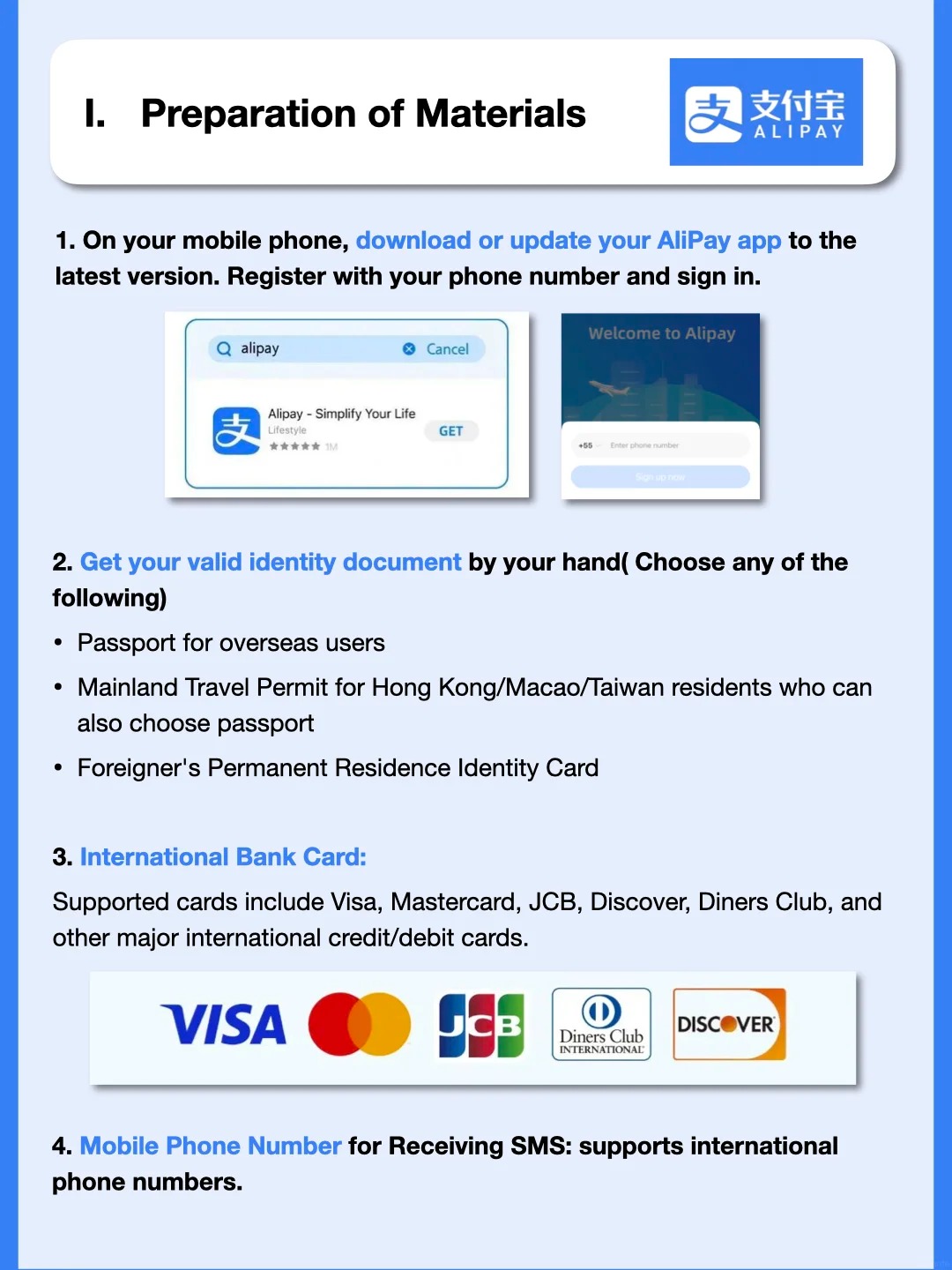
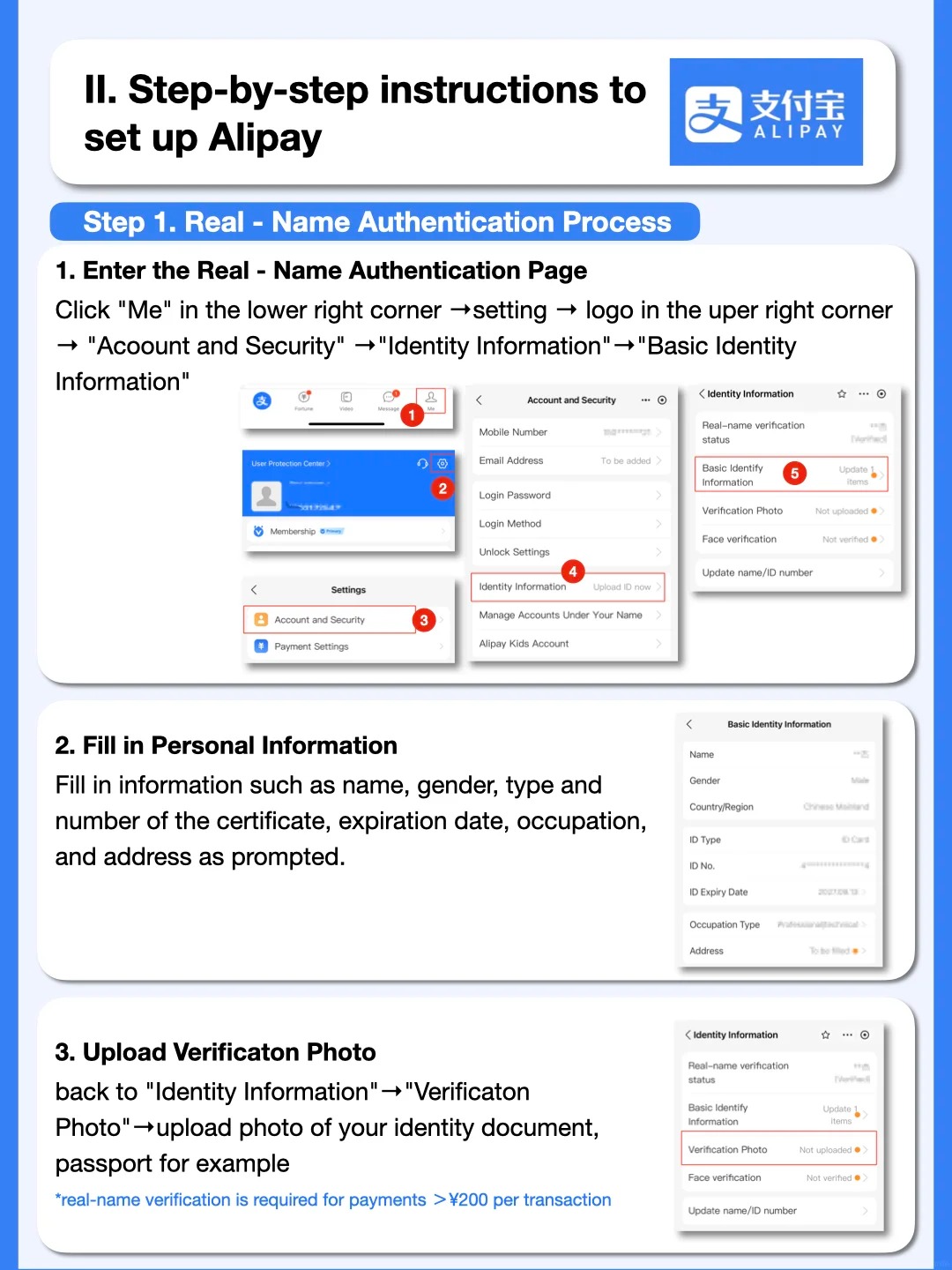
Registration uses your phone number; identity verification needs your passport
Step 3: Link Your International Card
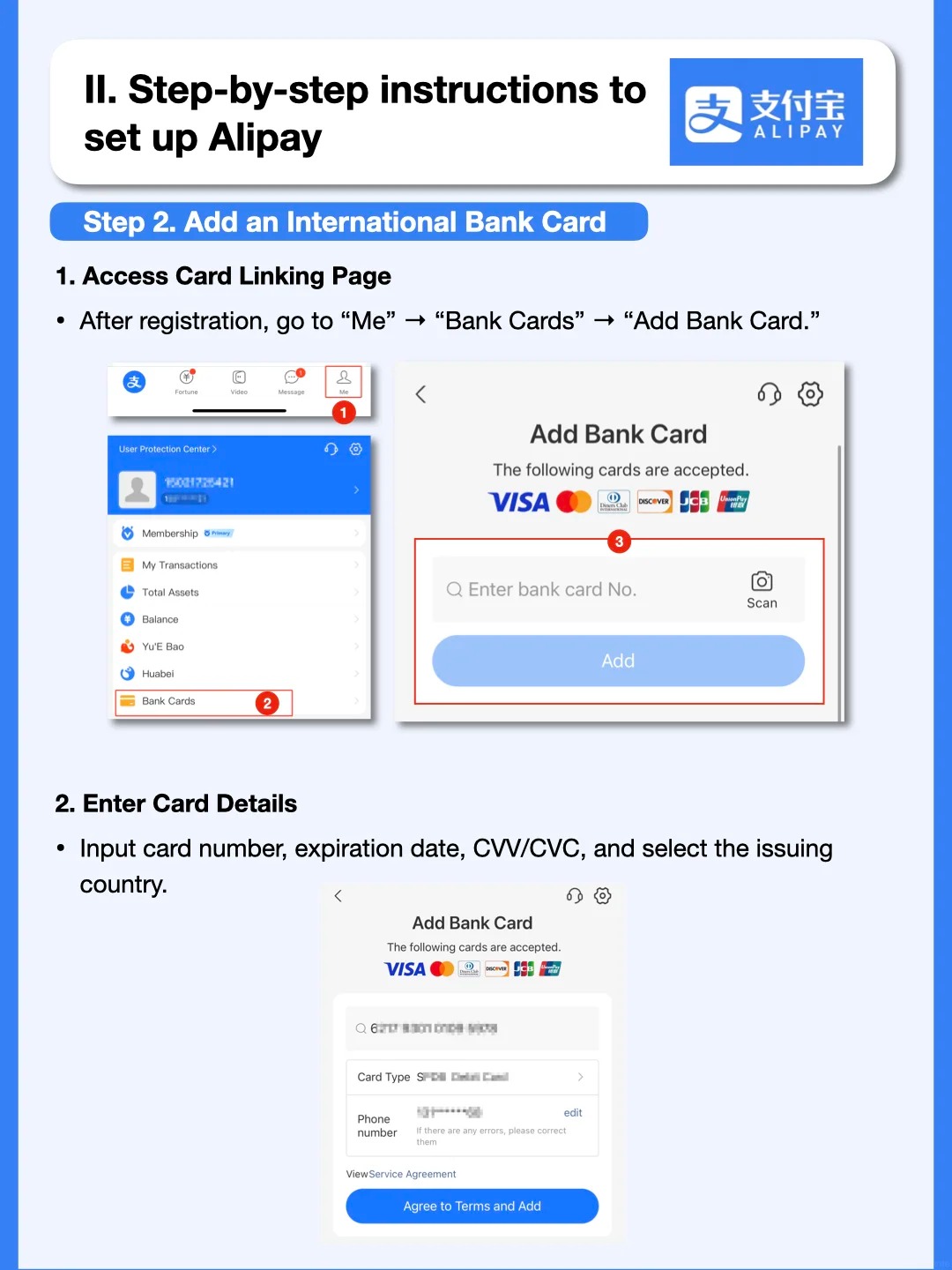
This is what makes the whole thing actually work. Alipay has an International Card option specifically for tourists — you link a Visa or Mastercard from home, and it converts to yuan at the point of payment. No Chinese bank account needed.
Add your Visa or Mastercard
- In Alipay, tap Me → Bank Cards → Add Card
- Select International Card (not Chinese bank card)
- Enter your card number, expiry, and CVV
- Complete the bank's 3D Secure / OTP verification
Best Credit Cards for Alipay in China from India
This is probably the section most useful if you're the type who tracks forex markups and reward rates — which, if you've read this far, you probably are.
I linked two cards for this trip: HSBC Premier and HDFC Infinia. Both linked without issues. Both worked across all four cities. But they behaved differently.
HSBC Premier was the surprise of the trip. I got discounts on several transactions — not huge amounts, but unexpected and genuinely appreciated when you're paying for everything digitally. I'm not sure if this is a specific HSBC-Alipay tie-up or just timing, but it happened consistently enough that I started defaulting to it.
HDFC Infinia worked perfectly everywhere and earns solid reward points on international spends, which post as regular foreign currency transactions. If you're collecting hotel points or miles, Alipay purchases count — just make sure the card's international transactions are enabled before you try linking it.
💳 Card tips for Alipay in China
- HSBC Premier — worked well, occasional discounts on Alipay transactions
- HDFC Infinia — zero issues, good reward earn rate on international spends
- Axis Magnus Burgundy — low forex markup, solid for travel esecially in an AEP month
- Avoid cards with 3%+ forex markup — every single Alipay transaction is a foreign currency conversion, it adds up fast on a 10-day trip
- Switching cards mid-payment is easy — Alipay shows your linked cards at checkout, you can swap before confirming
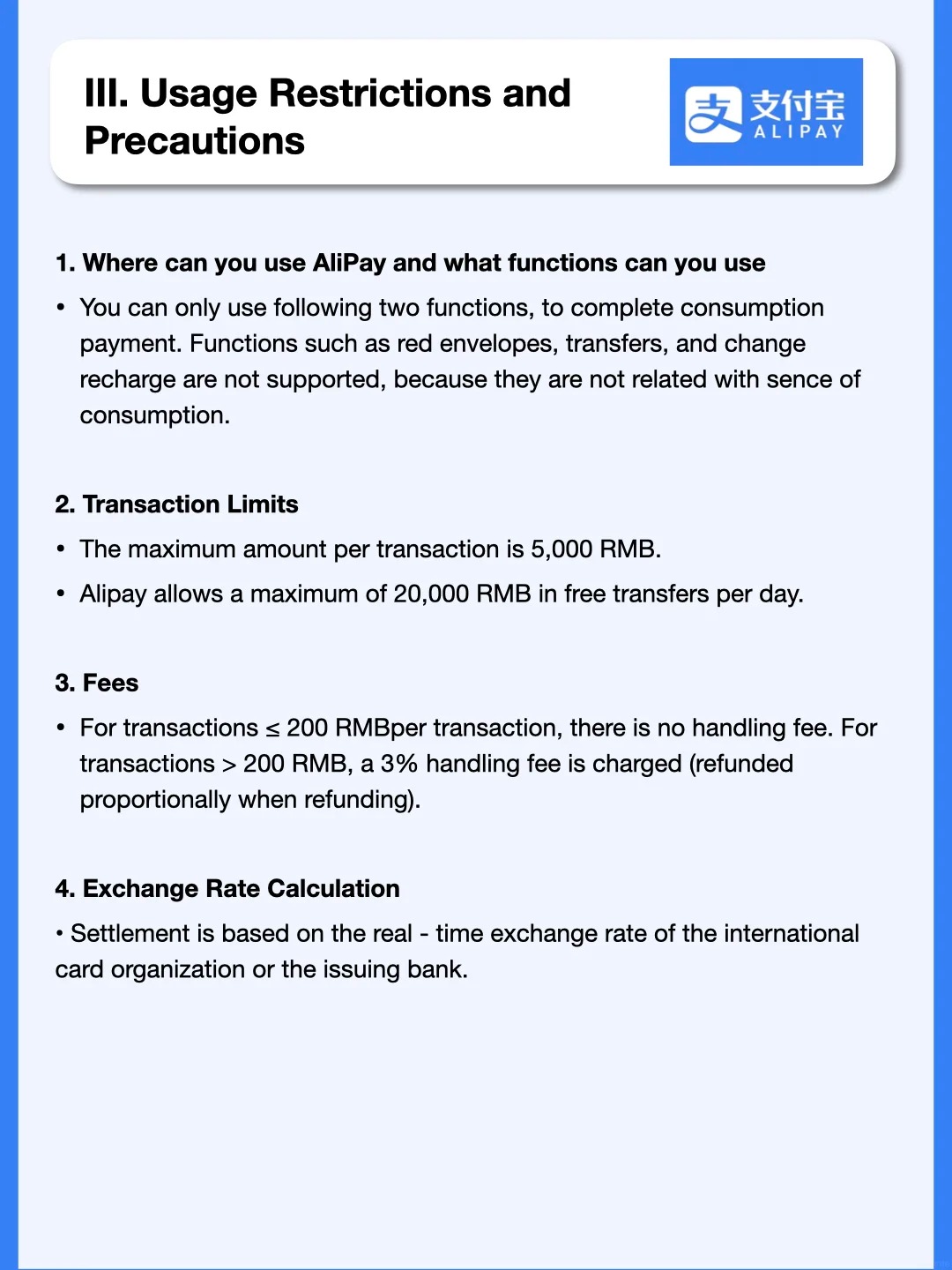
- Payments over ~200 RMB may attract an extra ~3% surcharge — ask the vendor to split the bill if it's a larger purchase
- Link a backup card before you leave — if your primary gets blocked mid-trip, you'll be glad you did
Why You Need a VPN — and Which One I Used
I nearly gave up on Alipay entirely because of this, and most guides don't mention it at all.
The app downloaded fine. It opened fine. But when I got to the card-linking screen, it just... sat there. Loading spinner. Nothing. I assumed it was a bug, and was mentally preparing to just carry cash through China.
Turns out Alipay's back-end doesn't play well with Indian IP addresses during setup — certain screens time out or refuse to load entirely. The app itself works, but some of the server calls in the registration and card-linking flow don't complete.
A VPN fixed it in under 30 seconds. The screen that had been spinning loaded immediately after I connected to a Singapore server.
Use a VPN during the setup process
- Download Proton VPN (free plan works fine) from the App Store
- Create a free account at protonvpn.com
- Connect to a Singapore, Hong Kong, or Japan server
- With VPN active, complete the Alipay registration and card-linking steps
- After setup is complete, you can disconnect — the app works normally in China without VPN
Even if you have no other reason to use a VPN, install one before departure. It has saved me more than once in countries with patchy internet.
What Alipay Actually Looked Like Across China
Across Shanghai, Chongqing, Shenzhen, and Guangzhou, here's what I used it for day-to-day:
- Metro rides — every city, every time. Scan the QR at the gate. Never failed once.
- Didi (Chinese Uber) — Alipay integrates directly with Didi. Honestly the most used thing on my entire trip.
- Convenience stores — Family Mart, Lawson, local stores. Show QR, beep, done.
- Restaurants — both scan-to-pay at the counter and scan-to-order at the table worked without a hitch.
- Tourist attractions — temple entry, cable cars, scenic area tickets. All Alipay.
- Shopping malls and luxury stores — no issues anywhere, including higher-end purchases.
- Street food stalls — even the tiny carts had QR codes taped to a plastic stand on the counter.
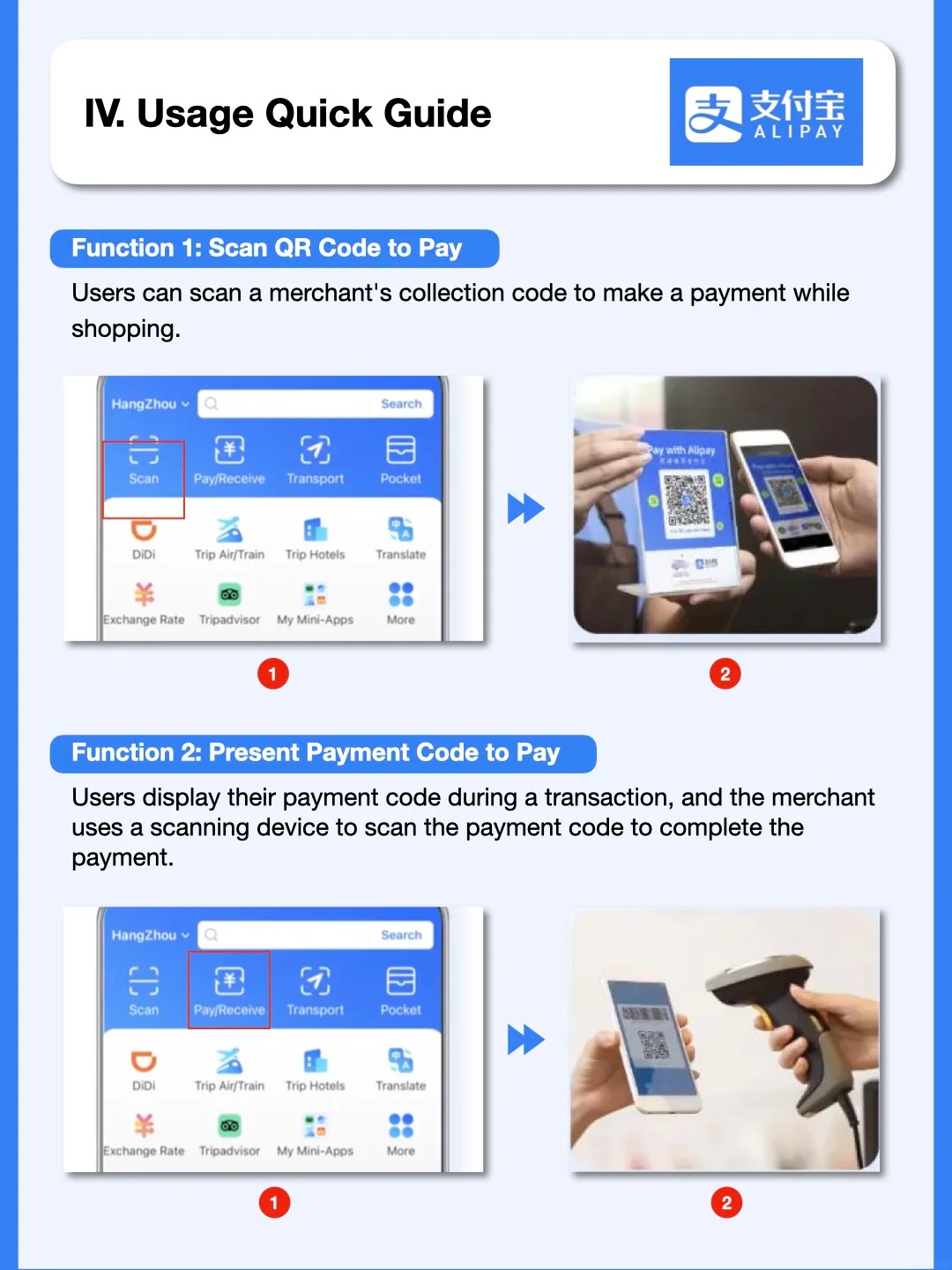
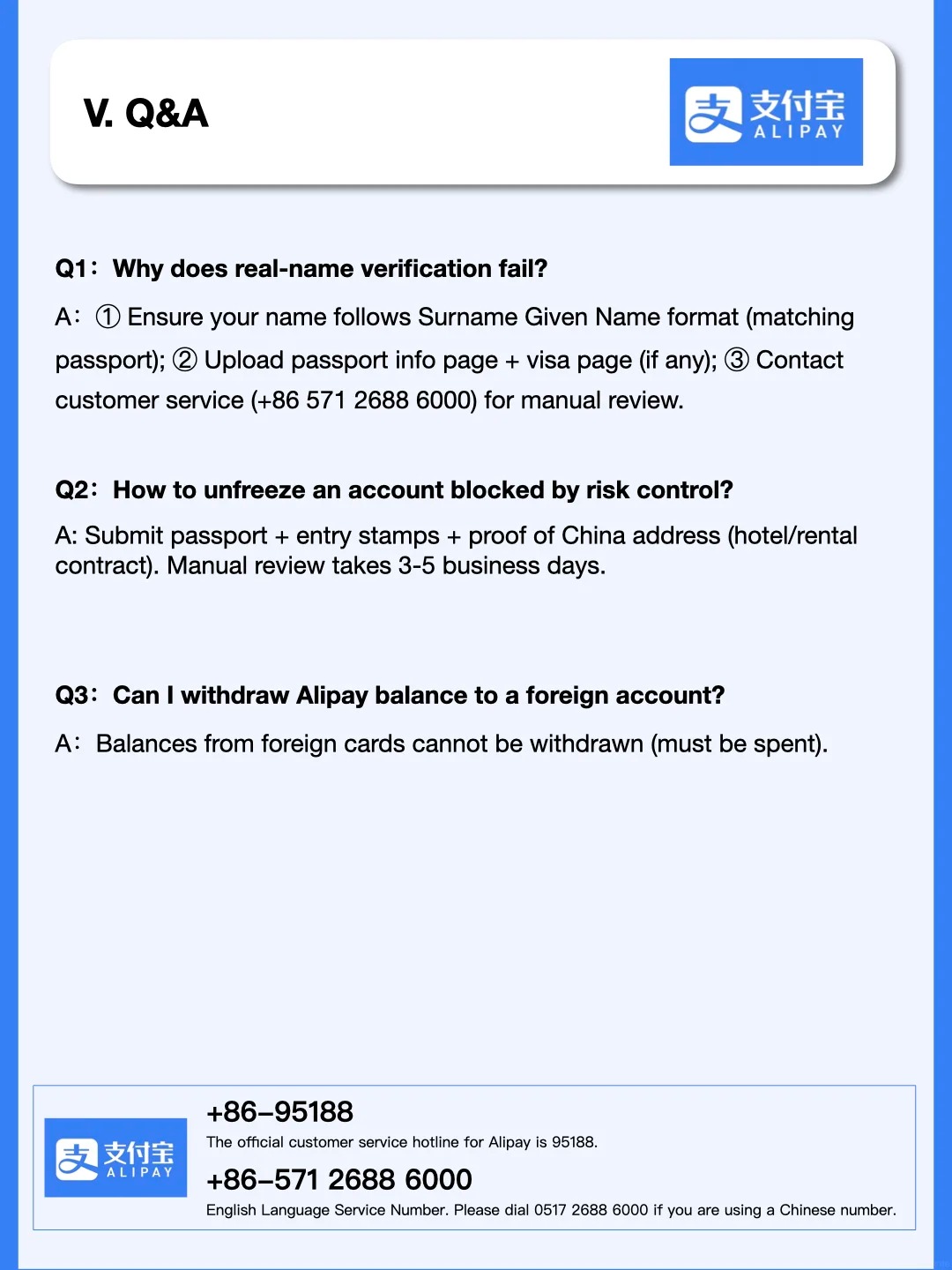
There were maybe 1 or 2 times across the whole trip where a merchant's terminal only showed WeChat Pay. Rare, but it happened — which is why having both is ideal even if Alipay gets you through most things. Our Shanghai Greeter volunteer actually flagged this early on the first morning and steered us towards spots that accepted both — genuinely useful heads-up.
🔠 Hidden feature: Alipay has a floating translate widget
This one took me a while to notice. Alipay has a built-in translate button that floats as a small draggable widget on your screen. Whatever page or text is showing, just tap it and it translates on the spot. There's also a dedicated Translation tile in the main app grid. It's not perfect, but it means you don't have to jump between Alipay and Google Translate every few minutes — the translator is just always there, floating wherever you left it.
Don't Ignore WeChat — It's More Than Just Payments
I know this post is about Alipay, but I'd be doing you a disservice if I didn't mention this.
If someone in China wants to contact you, they'll ask for your WeChat — not your phone number, not your email. It's not just a payment app, it's how people communicate, how businesses operate, how hotels talk to guests. Once you're there, you'll understand why.
At the Westin Chongqing and the Sofitel Guangzhou, we used WeChat to message hotel staff directly — to flag a room issue, ask for extra towels, request a late checkout. (During our stay at the Fairmont Peace Hotel in Shanghai, the concierge team also communicated via WeChat for anything we needed.) The hotels had WeChat IDs on their welcome cards, and staff responded faster than any call to the front desk would have. It felt like texting your building manager, except efficient.
WeChat is also how some restaurants handle menus. Luckin Coffee, for example — which is everywhere and honestly great — doesn't hand you a physical menu. You scan a QR code with WeChat, order through a mini-program inside the app, and pay. If you only have Alipay, you'll figure it out eventually, but WeChat makes these interactions seamless.
Setting up WeChat from India is more involved (it requires another account to verify you, which is a whole thing), but if you can manage it, do. Even a basic WeChat account that you can receive messages on will make the trip noticeably smoother.
Quick Summary: Your Pre-Departure Checklist
✅ Before you board your flight
- Create a second Apple ID in a non-Indian region (US / UK / Singapore)
- Download Alipay using that Apple ID, then switch back to your main Apple ID in the App Store
- Install Proton VPN (free plan) and connect to Singapore or Hong Kong
- With VPN active, register Alipay using your Indian (+91) number
- Complete identity verification — have your passport ready
- Enable international transactions on your Visa or Mastercard (call your bank or do it in net banking)
- Link the card inside Alipay under International Card and do a small test transaction
- Link a second backup card if you have one
- Note: payments over ~200 RMB may attract a ~3% surcharge — ask the vendor to split if needed
- Try to get WeChat set up too — you'll want it for hotel staff messaging and apps like Luckin Coffee
- Explore the Alipay translate feature before you land — it's more useful than you'd think
Can I Set Up Alipay Without Going to China?
Yes — and you should. Everything in this guide happens entirely from India, before you board your flight.
You don't need a Chinese SIM card, a Chinese bank account, or even a VPN once you're in China (only during setup from India). Registration uses your Indian +91 number, identity verification uses your passport, and card linking uses any international Visa or Mastercard.
In fact, setting it up after you land is harder — certain setup flows work better on non-Chinese IP addresses, and you'll have enough to deal with at the airport without fiddling with Apple IDs and VPNs.